Posts: 151
Threads: 0
Joined: May 2020
(10-18-2026, 11:54 AM)iddqd Wrote: Thank you. Is there any way to make the extensions' hover cards smaller, something like picrel by any chance? The new ones are too big and sometimes overlap with the extension controls
You can set chrome://flags/#extensions-menu-access-control to Disabled and restart the browser to restore the tooltips as they were before.
Posts: 3
Threads: 0
Joined: Oct 2026
(10-18-2026, 02:41 PM)S8F8ry Wrote: You can set chrome://flags/#extensions-menu-access-control to Disabled and restart the browser to restore the tooltips as they were before.
Thanks, mate
Posts: 1
Threads: 0
Joined: Oct 2026
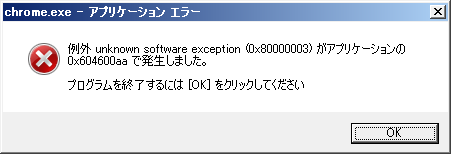
CentBrowser v5.3.1184.25 fails to launch on Windows 7 (32-bit Japanese Edition).
The following error window appears:
"Unknown software exception (0x80000003) occurred in the application at location 0x604600aa."
CentBrowser v5.2.1168.83 launches without any issues.
Contents of `debug.log`:
ERROR:third_party\crashpad\crashpad\util\win\registration_protocol_win.cc:136] TransactNamedPipe: The pipe has been ended. (0x6D)
ERROR:third_party\crashpad\crashpad\client\crashpad_client_win.cc:142] crash server failed to launch, self-terminating
Posts: 99
Threads: 4
Joined: Aug 2016
none of my font-changing userscripts work. 
Posts: 151
Threads: 0
Joined: May 2020
10-19-2026, 12:27 PM
(This post was last modified: 10-19-2026, 12:28 PM by S8F8ry.)
(10-19-2026, 06:22 AM)zoso Wrote: none of my font-changing userscripts work.
Is the "Allow User Scripts" option under the extension details properly checked?
If the option is already checked but the problem persists, you can try the following "brute force" method: first, back up the scripts and stored data within the extension; then, uninstall the userscript extension; finally, reinstall it and import the scripts and data back in.
Posts: 99
Threads: 4
Joined: Aug 2016
"Allow User Scripts" was not checked. thank you.
Posts: 2
Threads: 0
Joined: Dec 2019
10-19-2026, 02:10 PM
(This post was last modified: 10-19-2026, 02:18 PM by Skjeggete.)
Спасибо. Я привык запускать программу с помощью параметров командной строки, но не заметил этот пункт во внешнем виде.
(10-18-2026, 09:27 AM)S8F8ry Wrote: В версии 5.3.1184.25 вы можете включить эту функцию напрямую по адресу chrome://settings/appearance.
Спасибо. Я привык запускать программу с помощью параметров командной строки, но не заметил этого пункта во внешнем виде.
(10-18-2026, 09:27 AM)S8F8ry Wrote: В версии 5.3.1184.25 вы можете включить эту функцию напрямую по адресу chrome://settings/appearance.
Нам очень жаль, что у вас по-прежнему не получается нормально использовать Bluesky. Однако мы протестовали вход в систему и активно использовали https://bsky.app/, и нам не удалось воспроизвести проблему, которая приводит к сбою вашего браузера.
Может ли эта проблема быть связана с установленными расширениями? Например, как он ведет себя в безопасном режиме ( нажмите Alt+F, затем выберите «Перезапустить в безопасном режиме» в разделе «Справка» в верхнем меню )? Спасибо. Я привык запускать программу с помощью параметров командной строки, но не заметил этого пункта во внешнем виде.
Posts: 2
Threads: 0
Joined: Oct 2026
10-19-2026, 08:09 PM
(This post was last modified: 10-20-2026, 06:48 AM by SerB.)
Здравствуйте,отличная версия,работает хорошо,только один нюанс - браузер запускается с начальной страницы, при активированной кнопке - запуск - ранее открытые вкладки . Подскажите как исправить. ?
p.s. с 3 раза при запуске ,ранее открытые вкладки стали открываться ,т.е. они на месте.
Posts: 18
Threads: 5
Joined: Oct 2018
bro, thanks for not forgetting about us and updating the browser. yeah, i know there are problems, and i'll probably update a bit later if there's some kind of bug fix patch. anyway, thanks for your efforts and the time you put into this
what i was most excited for was the compact mode, and it's absolutely brilliant here!!!
компактный режим ТОП
поиск в закладках ТОП
ширина колонок распространяется на вкладки ТОП
Posts: 151
Threads: 0
Joined: May 2020
10-20-2026, 06:14 AM
(This post was last modified: 10-20-2026, 06:30 AM by S8F8ry.)
(10-19-2026, 08:09 PM)SerB Wrote: Здравствуйте,отличная версия,работает хорошо,только один нюанс - браузер запускается с начальной страницы, при активированной кнопке - запуск - ранее открытые вкладки . Подскажите как исправить. ?
Have you set it to restore the last session at chrome://settings/onStartup?
(10-20-2026, 03:27 AM)seanforde12 Wrote: After the new update (16-10-2026) I have not been able to open PDFs in Cent browser. The page fails to load.
I get "the page is not found" error or "It may have been moved, edited, or deleted" message.
See example below:
Link to broken PDF
This has happened on all PDF URLs since updating.
Also, navigating the cent browser forum is also extremely slow now as well. Any help would be appreciated.
This prompt typically indicates that an extension might be hijacking and attempting to use itself to open this PDF file. However, if an issue occurs, the request might be redirected to a page like chrome-extension://, causing the PDF file to be lost. When you encounter this problem, is the URL displayed in the browser's address bar still the original file's URL? If the URL has changed, you need to disable extensions to troubleshoot and identify which one is attempting the hijack. If the URL remains the same as the initial one, you can check whether the setting at chrome://settings/content/pdfDocuments is already set to "Open PDFs in Cent Browser".
|