Posts: 151
Threads: 0
Joined: May 2020
10-17-2026, 03:29 PM
(This post was last modified: 10-17-2026, 03:37 PM by S8F8ry.)
(10-17-2026, 02:09 PM)tamer Wrote: Thanks, the final version works just fine. A few issues I encountered while upgrading:
After cleaning up everything except the extensions using wipe.ps1 (except ResetExtensionSettings) it failed to start until I also deleted the "Service Worker" folder. I wanted to preserve the extension settings, otherwise it would be easier just to start with a fresh profile, but I needed the extensions to keep working.
When using a custom theme hovering over the address bar caused a crash. The theme needs to be removed under the "Appearance" tab in the settings.
And the tooltips are still white in dark mode. Except that there don't seem to be any visible bugs or issues.
The tooltip issue was introduced by the upstream Chromium project, and these tooltips now follow the system's color mode rather than the browser's appearance settings.
(10-17-2026, 08:57 AM)Александр Тихомиров Wrote: papadoc У меня не сработала --disable-features=GlobalMediaControls,MediaSessionService,MediaRouter
Normally, you just need to add --disable-features=MediaSessionService and restart the browser. Please note that you cannot have multiple --disable-features= commands; they must be concatenated into a single --disable-features= command, separated by commas.
Posts: 115
Threads: 18
Joined: Sep 2017
(10-17-2026, 08:57 AM)Александр Тихомиров Wrote: papadoc У меня не сработала --disable-features=GlobalMediaControls,MediaSessionService,MediaRouter S8F8ry appears to be correct. I was experimenting, but the one that matters now is:
--disable-features=MediaSessionService
Posts: 111
Threads: 0
Joined: Aug 2016
(10-17-2026, 03:29 PM)S8F8ry Wrote: The tooltip issue was introduced by the upstream Chromium project, and these tooltips now follow the system's color mode rather than the browser's appearance settings. Doh, you are absolutely right. But I prefer light mode system wide because most icons looks terrible in dark mode menus.  Here's the dark tooltips patch for this version.
Posts: 3
Threads: 0
Joined: Oct 2026
Hello, could you please tell how to remove the "Ask Google about this page" tooltip from the address bar? Also an extension hover tooltip card if there's such and option.

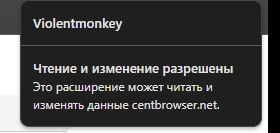
Like someone already mentioned before the "Auto hide the bookmarks" option crashes the browser which is very unfortunate.
Posts: 16
Threads: 1
Joined: Feb 2021
10-18-2026, 08:10 AM
(This post was last modified: 10-18-2026, 08:11 AM by rubbysh_Ye1d.)
(10-12-2026, 07:48 PM)rubbysh_Ye1d Wrote: Constant crashes after attempt to login at bsky.app via multilogin tab. I enter username and password, press "Login" - and Cent is died. Well, now stabe Cent 5.3 crashes everywhere at bsky.app even on ordinary tabs or incognito window. Please, investigate it ASAP. I don't want to run another browser just for Bluesky.
Posts: 151
Threads: 0
Joined: May 2020
(10-17-2026, 09:54 PM)iddqd Wrote: Hello, could you please tell how to remove the "Ask Google about this page" tooltip from the address bar? Also an extension hover tooltip card if there's such and option.
Like someone already mentioned before the "Auto hide the bookmarks" option crashes the browser which is very unfortunate.
Set chrome://flags/#omnibox-contextual-suggestions to "Disabled" and restart the browser.
Posts: 2
Threads: 0
Joined: Dec 2019
10-18-2026, 09:19 AM
(This post was last modified: 10-18-2026, 09:23 AM by Skjeggete.)
Hello. In the beta version, the compact mode worked, the portable stable version is not activated, the reason is not clear. (--cb-compact-ui --force-dark-mode)
Posts: 151
Threads: 0
Joined: May 2020
10-18-2026, 09:27 AM
(This post was last modified: 10-18-2026, 09:30 AM by S8F8ry.)
(10-18-2026, 09:19 AM)Skjeggete Wrote: Hello. In the beta version, the compact mode worked, the portable stable version is not activated, the reason is not clear. (--cb-compact-ui --force-dark-mode)
In version 5.3.1184.25, you can enable it directly at chrome://settings/appearance.
(10-18-2026, 08:10 AM)rubbysh_Ye1d Wrote: Well, now stabe Cent 5.3 crashes everywhere at bsky.app even on ordinary tabs or incognito window. Please, investigate it ASAP. I don't want to run another browser just for Bluesky.
We're sorry to hear that you're still unable to use Bluesky properly. However, we have tested login and general usage at https://bsky.app/, and we were unable to reproduce the issue that causes your browser to crash.
Could this problem possibly be related to an installed extension? For instance, how does it behave in safe mode ( Press Alt+F, then select "Restart in safe mode" from "Help" in the expanded menu)?
Posts: 3
Threads: 0
Joined: Oct 2026
(10-18-2026, 09:16 AM)S8F8ry Wrote: Set chrome://flags/#omnibox-contextual-suggestions to "Disabled" and restart the browser.
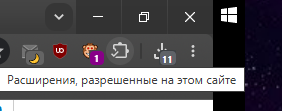
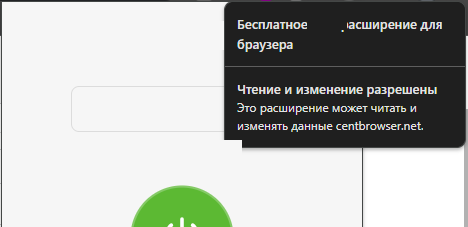
Thank you. Is there any way to make the extensions' hover cards smaller, something like picrel by any chance? The new ones are too big and sometimes overlap with the extension controls
Posts: 4
Threads: 1
Joined: Aug 2025
10-18-2026, 01:58 PM
(This post was last modified: 10-18-2026, 05:02 PM by Antonij72.)
If you close several vertical tabs in a row using the right mouse button, the browser tends to crash after the second or third tab is closed.
I’ve recorded a short video: https://ru.files.fm/f/348uungfjf8vxcgq
The video show Cent crashing after I closed several tabs in succession using the right-click menu.
Cent 5.3.1184.25 (16.10.2026)
(Running Windows 11, for what it’s worth.)
|





