Posts: 138
Threads: 23
Joined: Nov 2015
The feature itself is pretty useful, but it "corrupts" the icon of bookmark = while taking a place of original bookmark, it doesn't update/load new one, changing icon to "default/not-loaded". Icon doesn't get updated even after using this replaced bookmark.
Posts: 179
Threads: 0
Joined: May 2020
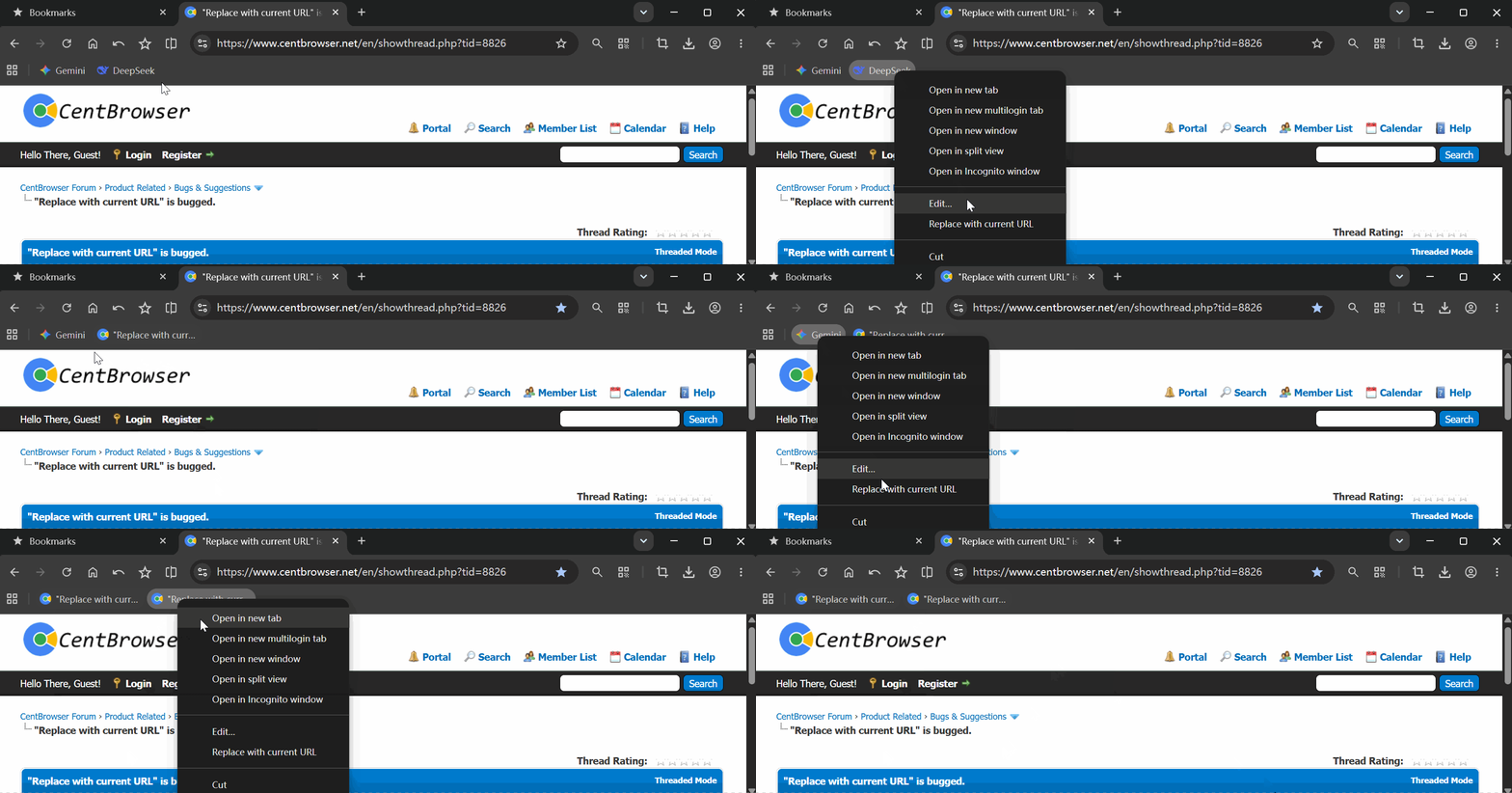
Thanks for your feedback. Is the icon of the URL you used for replacement itself normal? Because in my tests, the bookmark icon after replacement appears to be normal:
Posts: 138
Threads: 23
Joined: Nov 2015
10-29-2026, 11:24 AM
(This post was last modified: 10-29-2026, 11:31 AM by rey.)
Right now i bookmarked this page, switched to several other tabs/sites and tried "Replace" = after first replace bookmark got "default no icon" and stayed like that though the test. Though i must mention, that when i switched back to this page/tab and made final Replace - the icon updated to proper Cent's one. BUT when i made again same series of Replace on different sites and came back to this site/tab - Cent's icon didn't get back too. I'd presume that once-success was due to some caching, but a mystery remains why it failed after a minute. Yet at the same time, i really can't believe all the other sites have problems with their icons, cause if i simply add those to bookmarks(as usual, single time, without Replace) - their icons always added properly.
Just in case, while i'm using the latest 5.3, maybe it's exactly the x86 version's issue = can't check/compare x64.
Posts: 138
Threads: 23
Joined: Nov 2015
Additional info: seems like the bug happens only in incognito mode.(which is my main, that's why i didn't figure out before)
Posts: 179
Threads: 0
Joined: May 2020
(11-13-2026, 01:58 PM)rey Wrote: Additional info: seems like the bug happens only in incognito mode.(which is my main, that's why i didn't figure out before)
Yes, this can indeed be reproduced in Incognito mode.
However, in my opinion, although it may seem a bit odd, the current behavior is actually expected. This is because the cache data in Incognito mode is isolated from that in normal mode. The bookmark management system attempts to look up the corresponding website icon in the browser's cache. Due to this isolation mechanism, the system can only search within the cache data from normal mode and cannot read the cache data from Incognito mode. Therefore, if you have never visited this URL in normal mode, it will consistently return an invalid icon.
Posts: 138
Threads: 23
Joined: Nov 2015
(11-13-2026, 03:54 PM)S8F8ry Wrote: the current behavior is actually expected. This is because the cache data in Incognito mode is isolated from that in normal mode. The bookmark management system attempts to look up the corresponding website icon in the browser's cache. Due to this isolation mechanism, the system can only search within the cache data from normal mode and cannot read the cache data from Incognito mode. Therefore, if you have never visited this URL in normal mode, it will consistently return an invalid icon.
This brings 2 questions:
1. Then why user is overall allowed to add bookmarks in incognito, if it's so isolated? = and those bookmarks are equally visible/usable in normal mode.
2. Why bookmarks added in incognito do have icons, no matter the isolation mechanism, and only lose them on "replace"?
There is definitely some pass that Add uses, but Replace doesn't.
Posts: 179
Threads: 0
Joined: May 2020
(11-13-2026, 04:56 PM)rey Wrote: This brings 2 questions:
1. Then why user is overall allowed to add bookmarks in incognito, if it's so isolated? = and those bookmarks are equally visible/usable in normal mode.
2. Why bookmarks added in incognito do have icons, no matter the isolation mechanism, and only lose them on "replace"?
There is definitely some pass that Add uses, but Replace doesn't.
1. It isolates the cache data generated in Incognito mode; the browser can still view and interact with web pages, and bookmarks can also be added to the browser.
2. Indeed, when adding a bookmark directly, the browser can use the icon currently displayed in the active tab. However, the current operation of
Replace with current URL is equivalent to directly editing a bookmark and modifying its URL. Therefore, it does not retrieve the icon from the active tab but instead queries it from the browser's cache.
Posts: 138
Threads: 23
Joined: Nov 2015
(Yesterday, 02:18 AM)S8F8ry Wrote: However, the current operation of Replace with current URL is equivalent to directly editing a bookmark and modifying its URL. Therefore, it does not retrieve the icon from the active tab but instead queries it from the browser's cache.
May this be changed in future to feat with bookmark adding?
Posts: 179
Threads: 0
Joined: May 2020
(Yesterday, 10:37 AM)rey Wrote: May this be changed in future to feat with bookmark adding?
Alright, we'll investigate the feasibility of this feature in incognito mode.